
How do I unlock a FastNet Business user or reset their password?
You need to be a FastNet Business Administrator to unlock a user, reactivate an inactive user or reset a user’s password.
If the user has access to two-to-sign or three-to-sign accounts, another administrator may need to approve the request before the change takes effect.
Start by finding the user’s profile in FastNet Business Administration.
To find a user profile in FastNet Business
- Log in as an administrator.
- Select Administration.
- Select Users.
- Select User Profiles.
- Select the user’s User ID link.
After you’ve found the user profile, follow the steps for the action you need to complete.
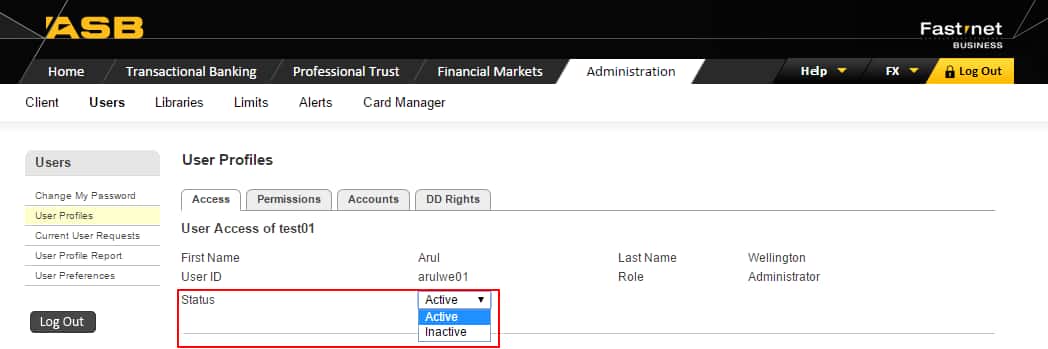
To unlock or reactivate an inactive user
- In the Status dropdown menu, select Active.
- Select Save.
- Select Current User Request, then approve the password reactivation.
If another administrator needs to approve the request, the user may not be unlocked or reactivated until the approval is complete.
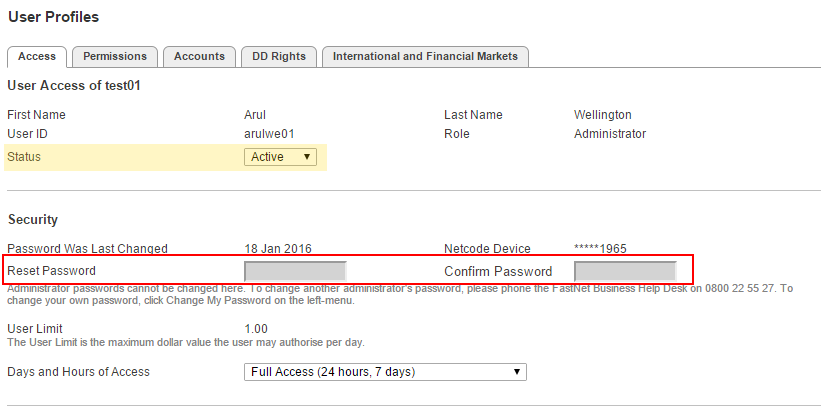
To reset a user password
- Check the user’s status is Active.
- Enter a temporary password in the Reset Password field.
- Enter the same temporary password in the Confirm Password field.
- Select Save.
- Select Current user requests, then approve the password reset.
Give the temporary password to the user securely. The user should log in with the temporary password and change it when prompted.
For help unlocking the user or resetting their password call the FastNet Business Help Desk on 0800 225 527 (+64 9 623 8763). Monday to Friday 8:00am to 6:30pm.
Related Answers
-
To unlock (reactivate) or reset a password for an Administrator can only be actioned by the FastNet Business Helpdesk. They ...
-
There are a few ways to check daily account and user limits, depending on what information you are looking for. ...
-
To change / remove permissions or account access for a user or administrator, go back into the users profile and ...
-
A new suffix should automatically appear on your FastNet Business site, however it is not automatically assigned to any users. ...
-
To delete an administrator Profile Deleting administrators can only be performed by the FastNet Business Helpdesk. To request a deletion ...
-
All netcode tokens must be ordered via the FastNet Business Helpdesk. You have a couple of options when requesting a ...
-
When a user profile has been deleted, it will be removed from the User Profiles – Users list. As a ...
-
When a user profile has been deleted, it will be removed from the User Profiles – Users list. As a ...
-
FastNet Business limit types FastNet Business has different daily limits depending on the type of payment, account, and user access. ...
-
There are two types of users on FastNet Business: Administrator User If you wish to change an administrator to a ...