
What is Caller Check?
When you're on a call with ASB, we can send a Caller Check notification to your ASB Mobile Banking app to help you check if it's us.
We may also use Caller Check when you call us or drop into a branch, to make sure we're talking to the right person before we share any details about your account.
Remember: ASB Caller Check is only available in the ASB Mobile Banking app. If you get a "Caller Check" anywhere else, it's a scam.
We've made some changes to Caller Check
From October 2026 Caller Check will look a little different depending on whether you're calling us, we're calling you, or you're in an ASB branch. Take a look at the examples below so you know what to expect.
What Caller Check looks like when we call you
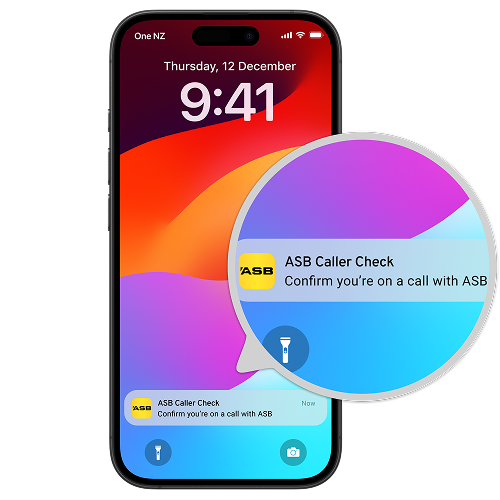
1. We'll send a notification to your ASB Mobile Banking app.

2. When you open the notification, you'll be prompted to log in to the ASB Mobile Banking app.
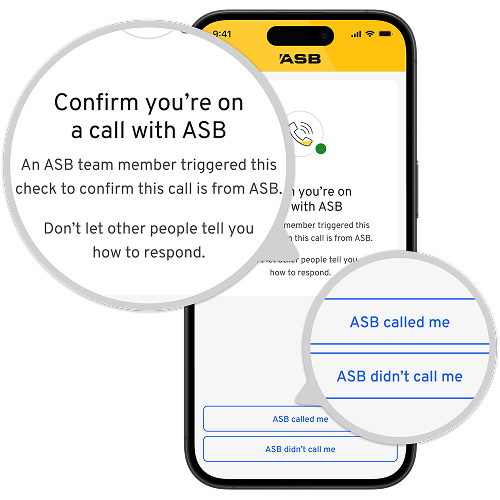
3. You'll see "Confirm you're on a call with ASB" and two options: ASB called me and ASB didn't call me. Select the one that's true. Never let anyone tell you which one to choose.
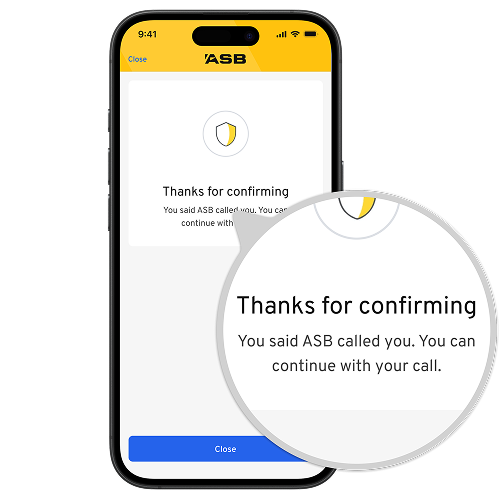
4. You'll see a confirmation screen.
- If you confirm ASB called you, you'll see "Thanks for confirming."
- If you confirm ASB didn't call you, you'll be prompted to hang up and secure your account.
What Caller Check looks like when you call us
1. We'll send a notification to your ASB Mobile Banking app.
2. When you open the notification, you'll be prompted to log in to the ASB Mobile Banking app.
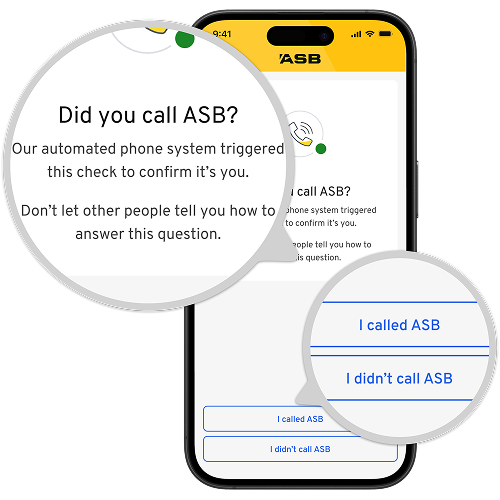
3. You'll see the question "Did you call ASB?" and two options, I called ASB and I didn't call ASB. Select the one that's true. Never let anyone tell you which one to choose.
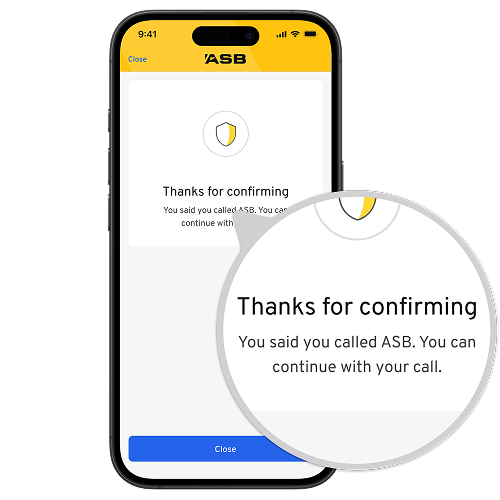
4. You'll see a confirmation screen.
- If you select, I called ASB, you'll see "Thanks for confirming."
- If you select, I didn't call ASB, we'll prompt you to hang up and secure your account.
Note: Our automated phone system and ASB staff can send Caller Check, and we may also use it when you visit a branch. The screen and wording may vary a little in each of these situations or depending on your app version, but a genuine Caller Check will only appear in the ASB Mobile Banking app.
Remember: Always read the Caller Check message carefully, choose the option that matches what you're doing, and never let someone tell you which option to choose.
-
Unexpected Caller Check?
If you get a Caller Check when you're not on a call with ASB or visiting a branch, someone may be trying to impersonate you. Only confirm an interaction if you're genuinely speaking with ASB.
Remember: ASB will never ask for your Netcode, and genuine Caller Check notifications only appear in the ASB Mobile Banking app. If you get one anywhere else, it's a scam.
Unsure about a call?
Ask the caller to send a Caller Check, especially if they claim to be from ASB. If they can't, or it doesn't appear in the ASB Mobile Banking app, hang up and call ASB on a publicly listed number.
You can also call our 24/7 Fraud line on 0800 ASB FRAUD (0800 272 372) or +64 9 303 0332 from overseas.
What you will need
To use Caller Check, you'll need to:
- Make sure you have the latest ASB Mobile Banking app downloaded.
- Ensure your device is Netcode verified.
- Make sure you enable push notifications for the ASB Mobile app in both your phone's notification settings and the ASB Mobile app settings.
Why we've introduced Caller Check
Scammers are always evolving, but so is ASB. There's been a concerning rise in bank impersonation scams in Aotearoa New Zealand, where scammers are making calls to customers pretending to be from ASB. These bank scam calls are tricky to spot and can have devastating consequences.
Caller Check is another innovation to help us all get one step ahead of scammers.
Ways we're protecting you
-
24/7 support on 0800 ASB FRAUD (0800 272 372).
-
Confirmation of Payee to check account owner name and number match.
-
Advanced AI fraud protection monitoring to detect unusual behaviour.
-
Secure in-app messaging to let us know if a flagged transaction is genuine.
-
Caller Check is an extra layer of protection to help you check if it's ASB calling.
-
The ASB Scam Hub with tips and tools for keeping safe from scammers.
Frequently Asked Questions
How do I know it's a genuine Caller Check notification?
They only appear in the ASB Mobile Banking app. If you get a "Caller Check" anywhere else, such as a website, WhatsApp, Telegram, text message, or email, it's a scam.
Why should I use Caller Check?
Caller Check helps prevent impersonation scams and check if you are speaking with a legitimate ASB representative and vice versa. If you're on a call claiming to be from ASB but they can't send you a Caller Check notification, hang up and report this to our Fraud line (0800 ASB FRAUD).
I was told not to click on links that ask me to log in to my banking. Is it safe to click on the ASB Caller Check notification?
Yes. Caller Check is different because it's a notification sent through the ASB Mobile Banking app and will only ever appear there. But, you're right to be cautious about links in text messages or emails that ask you to log in to your banking.
If you get a Caller Check when you're not speaking with ASB or visiting a branch, someone may be trying to impersonate you. Always read the message carefully and choose the option that matches what you’re doing (if we called you or you called us) or visiting a branch. Never let anyone tell you how to respond.
I didn't get the notification pop up on my phone.
If you don't see the notification pop up on your phone, you can find it in your ASB Mobile app. Open the app, select the bell icon and swipe down to refresh the screen. The notification will expire in 3 minutes from when ASB sends it.
To receive ASB notifications on your phone, you need to enable push notifications in both your phone's notification settings and the ASB Mobile app settings.
I don't use the ASB Mobile app, how can I confirm it's ASB I am talking to?
Now's a great time to set up the ASB Mobile app, a safe and secure way to do your banking. Find out more about the app and getting set up on our website.
Check out our other ways to verify, or if you're not sure it's ASB on a call, hang up and call us back on our public number, 0800 803 804.
I received a Netcode Text Message with a code / number from someone saying they're sending me a Caller Check Notification?
Caller Check uses phone notifications sent to the ASB Mobile Banking app, not text messages or a Netcode. It will never contain numbers or be sent via SMS (text message). ASB staff will never ask you for your Netcode. If you are asked this from someone saying they're from ASB, hang up immediately, report this to 0800 ASB FRAUD and reset your password.
Need help?
Call us
If you're worried that there has been a breach in your ASB account security, please get in touch with us immediately on 0800 ASB FRAUD (0800 272 372 or +64 9 303 0332 if you're overseas. Our team are here to help 24/7.